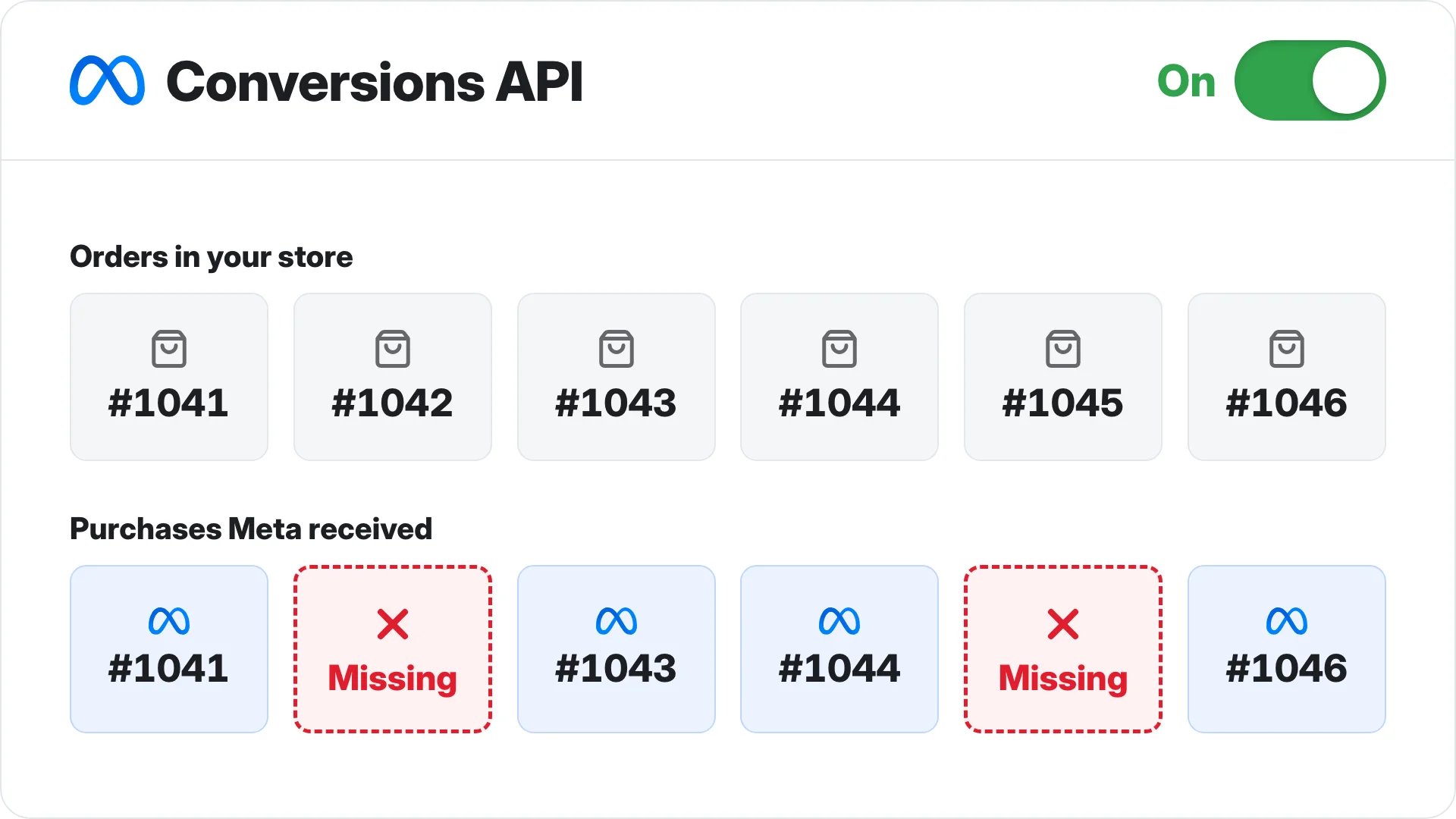
Here's what the Meta Conversions API (CAPI) is, how it works next to the pixel, the ways to set it up, and how to check whether yours actually sends Meta the sales your pixel misses.
Every guide on CAPI says the same thing: it goes server to server, so ad blockers can't stop it. That's only half true. A lot of CAPI setups start from the browser, and when the browser is blocked, the server event never happens either.
So the question isn't only whether you have CAPI turned on, it's where your CAPI event comes from: the browser, or the sale.
What is the Meta Conversions API (CAPI)?
The Meta Conversions API (CAPI) sends your conversion events, like a purchase, a lead or an add to cart, from your server to Meta, instead of from the visitor's browser like the Meta pixel does. Meta CAPI, Facebook CAPI and the Conversions API are all the same thing.
That one difference, server instead of browser, is the whole reason CAPI exists. It's also where a lot of setups go wrong, which I'll get to further down.
It isn't a way around Apple's tracking prompt (ATT) or cookie consent, though. It follows the same privacy rules as the pixel, and Meta says so itself.
What it does give you is a second way to get your conversions to Meta, plus a way to send the ones that never happen in a browser at all, which Meta lists as qualified leads, new customer purchases, phone calls and offline sales.
Meta pixel vs CAPI: what each one does
Meta tells you to run the pixel and CAPI together, and if you don't know what each one does, you can't tell which one is failing when your numbers don't match. Here's the difference.
| Compared | Meta pixel | Conversions API |
|---|---|---|
| Where it runs | The visitor's browser | Your server, or a server someone runs for you |
| What can stop it | Ad blockers, Safari's tracking limits, a page that doesn't finish loading | Nothing in the visitor's browser, as long as the event starts on the server |
| What it sends without you doing anything | The IP address and user agent, the browser adds them | Nothing, you have to send the IP address and user agent yourself |
| What it can send | Actions on your website | Website actions, plus things that happen off it (phone calls, qualified leads, offline sales) |
| What it's for | Seeing what happens on the page | Sending what happened, from where it was recorded |
How much the browser side loses is its own topic, which I covered in browser tracking is dying, and whether the pixel on its own is enough for a Shopify store is this post.
Meta recommends running both and sending the same events from each, which it calls a redundant setup. That way, when the browser drops a sale, the server still has a chance to send it.
How CAPI deduplication works, so a sale isn't counted twice
Sending every purchase twice sounds like it would double your numbers, and if deduplication isn't set up right, it does, and Ads Manager shows sales you never made.
It's one of the reasons Meta shows more purchases than Shopify or your CRM, and a lot of advertisers blame Meta's reporting when it's their own setup (the other reasons are in why your backend sales don't match Facebook purchases).
Deduplication is how Meta tells 2 copies of the same sale apart from 2 different sales. When the browser and the server send an event with the same event name and the same event ID, to the same pixel, within 48 hours, Meta counts it once.
Say a purchase fires in the browser with event ID 123 and from your server with event ID 123. Meta counts 1 purchase. If the server sends it with event ID 456 instead, Meta has no way to know it's the same sale, so it counts 2.
Now the rule that matters most here. If no browser event came in during the 48 hours before, Meta doesn't throw the server event away, it keeps it, and that's how a server event fills in for a sale the browser missed.
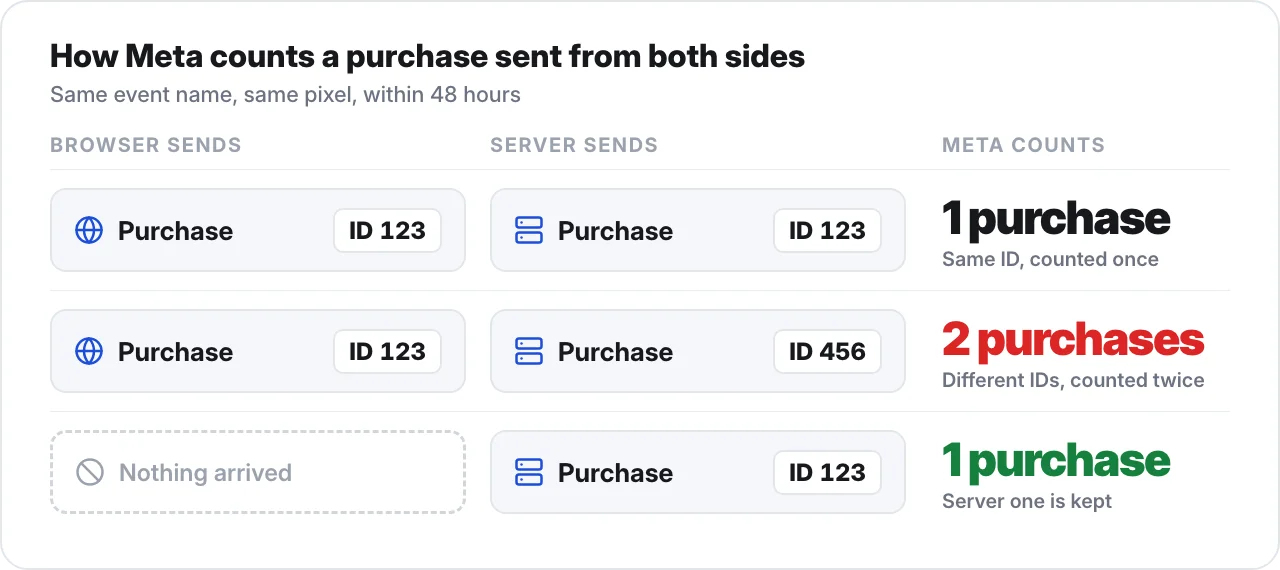
One more rule: 2 events that both come from the server are never deduplicated, so if your server sends the same sale twice, Meta counts it twice.
So deduplication does 2 jobs: it counts a sale once when both sides send it, and it keeps the server event on its own when the browser never sent one.
What Meta matches your CAPI events on
But a server event that Meta keeps still only helps if Meta can tell who bought and which ad they came from. If it can't match the event to a person, it can't use that sale to find you more buyers.
Tracking goes both ways. Your pixel or your server records what happened on your side, but Meta needs that sale sent back with who bought (their email) and which ad they clicked (the click ID, which Meta calls fbc).
Without those, the event arrives and Meta can't do much with it.
Email and the click ID are the 2 that Meta values most. After them come the phone number, an external ID (your own customer ID), the browser ID (fbp) and the country. Meta also says to send fbc and fbp with every event, not only Purchase.
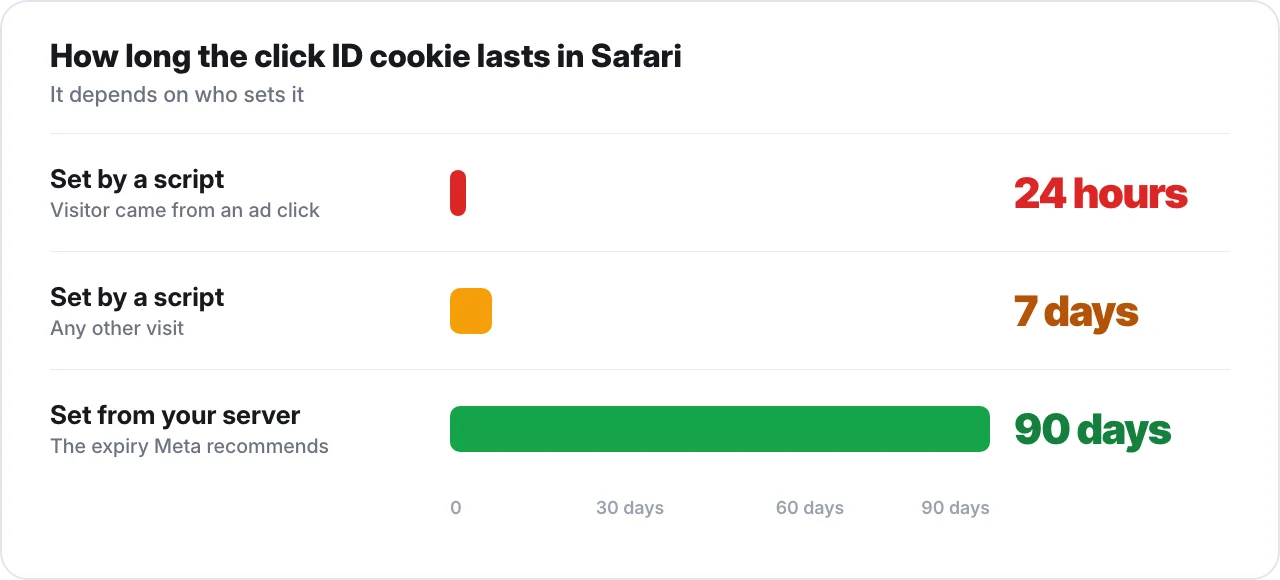
The click ID also has to last long enough to be sent. Meta says to set the _fbc cookie from your server with a 90-day expiry, because Safari deletes cookies set by scripts after 7 days, and after just 24 hours when the visitor arrived from a link with tracking on it.
An ad click is exactly that kind of link, which I went into in Safari strips the click ID.
Meta grades all of this with an event match quality score, but a higher score on its own won't make your ads perform better, which I covered in this post on event match quality.
Send the email and the click ID with every event, and set the click ID cookie from your server so Safari doesn't delete it a day after the ad click.
The ways to set up Meta CAPI, and where each one gets its events
There are 6 ways to set up Meta CAPI, and the one you pick decides whether it catches the sales your pixel missed or just sends Meta the same sales a second time.
Maybe you set CAPI up yourself, a freelancer did, or you clicked the button in Events Manager. Either way you see "Server" next to your events, and every guide said server to server means ad blockers can't stop it, so it looks done.
But a server event is only as good as whatever triggers it. If the pixel or a request from the browser triggers it, anything that blocks the browser blocks the server event too, because the server never hears about the sale and has nothing to send.
Here's each setup and where its events start.
| Setup | Cost | Effort | Where the event starts | Sends a sale the browser didn't see? |
|---|---|---|---|---|
| Meta's one-click CAPI | Free | One click | The pixel, it copies what the pixel sends | No, if the pixel never fires there's nothing to copy (web events only) |
| Conversions API Gateway | Your own AWS or Google Cloud bill | You set it up and host it | The pixel, Meta's docs say the pixel sends to the Gateway every time it fires in the browser | No, a test with an ad blocker running showed nothing reached the Gateway either |
| Server-side GTM | Your server hosting bill | Needs someone who knows GTM | Usually the browser GA4 request | Usually no, block the browser request and the server event never happens |
| Shopify's Facebook & Instagram app | Free with Shopify | A setting, Enhanced or Maximum data sharing | Shopify says the purchase goes server to server | For the purchase, Shopify says ad blockers can't block it. Other events, and whether they carry the click ID, aren't documented clearly |
| A partner tool or a direct integration | Varies | A direct build from your developer is 2-4 weeks of work, per Meta | Depends how it's built | Depends how it's built |
| From your backend, the order or lead itself | Varies | Depends on the tool or build | The sale, recorded in your store or CRM | Yes, as long as it carries the email and the click ID |
Meta launched the one-click option in April 2026, and its own Gateway page now says that if you only need web events, one-click covers you without hosting anything. So the Gateway mostly adds a cloud bill.
Server-side GTM runs off the browser because Meta's own GTM guide describes the flow as the GA4 tag in the browser, then your server, then Meta (more in why I don't use Google Tag Manager for conversion tracking).
Shopify's app is the exception for the purchase, and that row sticks to what Shopify's own help page says (more on Shopify's side in Shopify took control of your pixel data).
That leaves the last row, sending from your backend. It's the only setup that starts from the sale itself, the order in your store or the lead in your CRM, so it can send Meta a purchase the browser never saw, as long as it carries the email and the click ID from the last section.
TrueMetriks works this way, it sends each sale from the order with the identifiers Meta matches on, and there's a full comparison here.
I believe the "Server" label in Events Manager is where a lot of advertisers stop looking, because it feels like proof that CAPI is covering you, and it isn't.
A server event that starts in the browser gets blocked by exactly the same things as the pixel. The label only tells you which pipe the event came through, not whether it caught a sale the pixel missed.
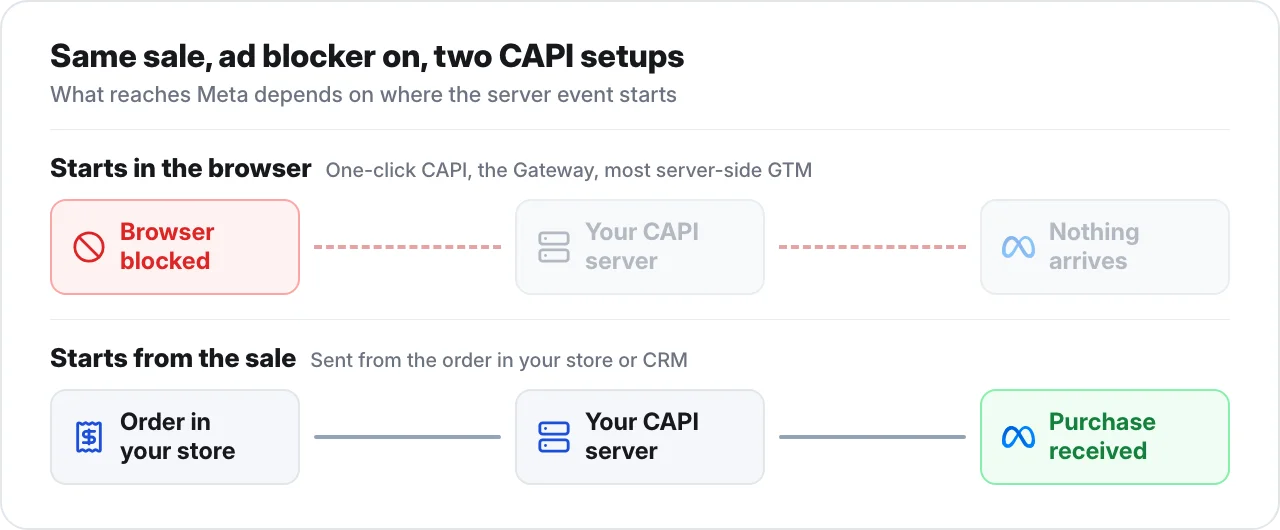
So where your CAPI event comes from matters more than whether you have CAPI at all, because only a server event that starts from the sale can send Meta a purchase the browser never saw.
How to check your CAPI setup in 10 minutes
You don't have to guess which kind of setup you have, and you shouldn't, because the "Server" label looks exactly the same whether the event started from the sale or from the browser.
- Go to Events Manager, open your dataset and go to Overview. For each event, see whether it shows Browser, Server or both, and check the deduplication rate.
- Open Test Events, make a test purchase, and see whether it arrives from the browser, the server or both.
- Now the real test. Take one week and compare the purchases Meta reports with the orders in your backend that came from Meta traffic (the ones with Meta as the UTM source).
- Optional: install an ad blocker, buy something, and see whether a server event still arrives. If the browser event goes missing and the server one still shows up, your server event isn't starting from the browser.
Steps 1 and 2 only show that events are arriving, and the sales that never arrived don't appear anywhere in Events Manager.
Step 3 shows them, because your backend recorded every order whether Meta heard about it or not (if Meta shows more purchases than your backend, go back to the deduplication section).
On forums you'll hear that a 30% gap is normal. It isn't. What we see with our clients is that under 10% is achievable once sales are tracked properly and sent back to Meta.
So if Meta reports a lot fewer purchases than your backend recorded from Meta traffic, well past that 10%, your CAPI isn't catching what the pixel misses, whatever Events Manager labels it.
Common Meta CAPI mistakes that count a sale twice or lose the match
Even a CAPI that starts from the sale can send Meta bad data, and these mistakes either count your sales twice or stop Meta matching them to the person who bought.
- Event IDs made separately in the browser and on the server. They never match, so every sale counts twice.
- Event names that differ, like "Purchase" from one side and "purchase" from the other. Meta treats them as 2 different events.
- Server events sent too late. If the server event lands outside the 48-hour window, it can't be deduplicated against the browser one.
- fbp or the IP address hashed when they have to be sent raw, or the email sent unhashed when it has to be hashed.
- Placeholder emails, a fake address filled in when there isn't a real one. Meta can't match that to anyone.
- event_time not in UTC, so Meta reads the event as happening at the wrong time.
- Only Purchase sent from the server, when the other events matter too.
Most of these are fixed by making the browser and the server send the same event name and event ID on time, and sending the email hashed and the click ID raw.
Meta CAPI FAQ
Here are the questions about Meta CAPI that come up most, answered in a line or two each.
What does CAPI stand for in marketing?
CAPI stands for Conversions API. It's Meta's way to send your conversions, like purchases and leads, from your server instead of from the visitor's browser.
Is CAPI the same as the Facebook pixel?
No. The pixel runs in the visitor's browser and CAPI runs on a server, and Meta recommends sending the same events from both.
Do I still need the pixel if I have CAPI?
Yes. Meta recommends running the pixel and CAPI together, with deduplication set up so each sale is only counted once.
Does CAPI get around ad blockers?
Only if the server event starts from the sale. If it's triggered by the pixel or a browser request, an ad blocker stops it too.
What is the Conversions API Gateway?
It's a CAPI setup you host on your own AWS or Google Cloud account. The pixel feeds it, so when the pixel is blocked, it sends nothing.
Is Meta's one-click CAPI enough?
It's free and quick to turn on, but it copies what the pixel sends. So it can't send Meta a sale the pixel never saw.
Does Shopify's Facebook app use CAPI?
Yes. On Enhanced or Maximum data sharing, Shopify says the purchase event goes server to server, but which other events do, and whether they carry the click ID, isn't documented clearly.
Does CAPI improve results?
Meta reports a lower cost per result with CAPI than without it. How much it helps you depends on whether your CAPI sends Meta sales it wasn't already getting from the pixel.
So where does your CAPI event come from?
Anyways, having CAPI turned on and having CAPI that catches the sales your pixel misses are not the same thing, and the label in Events Manager won't tell you which one you have.
So look at where your server events start, and compare the purchases Meta reports with the orders in your backend for a week, because that's where the answer shows up.
If it starts from the browser, it misses what the pixel misses, and if it starts from the sale, it can send Meta the purchases your pixel never saw.