There is a setting buried in your Shopify store that quietly changed in January, and depending on how Shopify reads your pixels, it may already be cutting the data your ads run on without telling you.
You won't see it in your reporting. If you check Ads Manager you'll see conversions are still coming through. Nothing on the screen looks wrong, so you assume tracking is handled and you move on.
But give it a few weeks and you start to feel it. Your ad performance slips. Revenue drops and fewer people are buying from your store.
And the worst part is you will not understand why. Nothing on your end changed. Same ads, same store, same offers.
What changed is that Shopify is now deciding whether your pixel is worth sharing data with. Not you. Shopify.
What Shopify actually changed
So here is what actually flipped, in plain English, because it's easy to miss and it touches every ad pixel on your store.
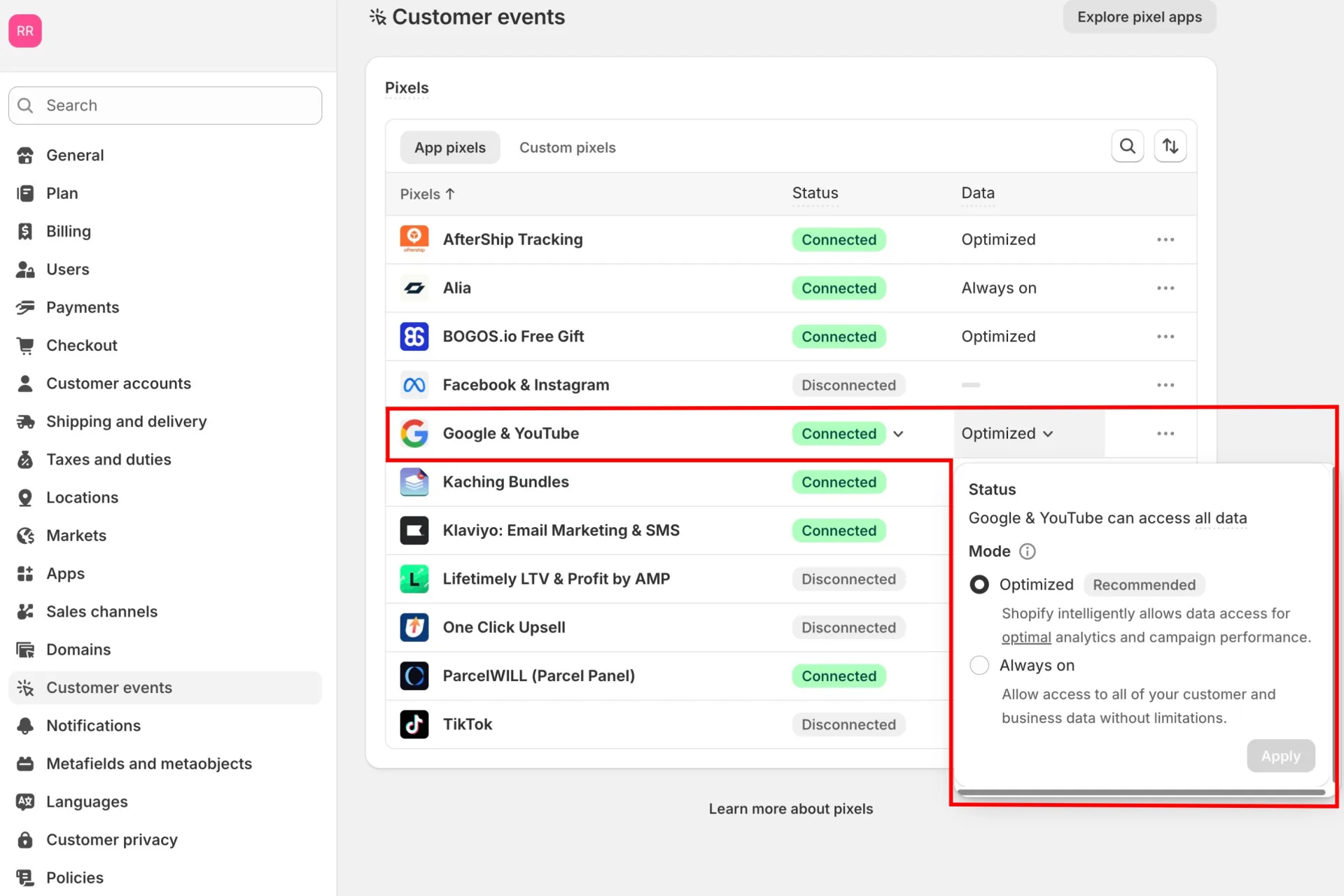
Every active third-party App Pixel on your store, your Meta pixel, your Google and YouTube pixels, your TikTok pixel, used to run on a setting called "Always on." Now they default to "Optimized."
Under Optimized, Shopify sits and watches. It watches your traffic, your sales, the UTMs and the click IDs coming through with each visit, and it uses all of that to decide whether a given pixel is "useful."
And if Shopify decides a pixel isn't "useful," it pauses sharing data with that pixel.
The problem here is that Shopify is deciding what counts as useful, and it does that using logic nobody outside Shopify can actually see.
And that logic decides whether your tracking pixel gets the data it needs so it can report back to the ad platforms, or if that pixel gets paused.
Why a paused pixel quietly raises your costs
A paused pixel sounds harmless until you understand what the ad platform is actually doing with that data. Because the moment the data flow stops is the moment your results start going down, with nothing on your dashboard looking wrong.
Here is the part that makes it so easy to miss. A pixel can fire without the data the ad platform actually needs. The data goes missing, but the pixel still fires.
So everything on your end looks fine. You see sales coming in, but what you do not see is that those sales are incomplete. They are missing the pieces Meta needs to know who bought and which ad sent them.
Without those pieces, Meta cannot optimize your campaigns or go find more people like the ones already buying from you. So it falls back on the only thing left. It guesses.
And once Meta is guessing, it spends your budget blind, putting your ads in front of people who were never going to buy. That is why your results start going down.
The one-minute fix, and what it doesn't solve
The good news is you can switch this back in under a minute, and you should do it today.
Go to Settings, then Customer events, then App pixels. Find the Data column. Switch it from "Optimized" back to "Always on." That's the whole fix, and it's worth doing right now.
Now, one important thing you need to understand. Flipping that toggle puts the data flow back on. It does not change who owns the toggle.
Most people flip it, feel the relief, and close the tab thinking the problem is solved for good. It isn't.
Shopify still controls that switch and the logic behind it, and Shopify already showed you exactly what it's willing to do with that control.
It changed the default once, on every store, with no notice. There's nothing stopping it from doing that again.
You only fixed the symptom on a system you still don't control because the switch is in Shopify's hand.
The fix Shopify can't touch
If you want this to stop being something you have to watch, the move is to get your conversion data flowing on a path Shopify doesn't get to control in the first place.
Instead of leaving your tracking to a pixel Shopify can pause whenever it wants, you run your own custom pixel that sends your data straight to the ad platforms.
This is exactly how TrueMetriks tracks your store, and setting it up is simple. You copy one line of code from your TrueMetriks dashboard, paste it into your shop, and it starts tracking everything that matters.
Every event on your store gets captured. No data gets lost. Everything gets reported.
That means the ad platforms get accurate data, and so do you. You can finally see which ads are actually performing and where your sales are really coming from.
And because the platforms are getting the full picture instead of a half-empty one, they can optimize properly and bring you more buyers instead of guessing with your budget.