Most Shopify owners set tracking up the same way.
You copy the Meta pixel code, maybe add a CAPI app on top because someone said you should, and then you move on.
The events fire green in Events Manager, so you assume the job is done.
But here is the uncomfortable part. Setting up the pixel is not the problem.
The real question is whether the pixel is actually doing its job.
Two parts make the pixel work, and everyone works on the wrong one
Installing the pixel on your store is the easy part. And that part has never been where tracking breaks.
The hard part is everything that happens after the pixel goes live.
The pixel has to collect the right data, get all of it, and send it back to Meta before anything blocks it along the way.
That is the half almost nobody thinks about, and it's the half that decides whether your tracking actually works.
Problem one: the pixel gets blocked
Start with the first leak. The Meta pixel lives in the browser, because the browser is where it fires.
But the browser is also exactly where ad blockers do their work.
So the blocking happens in the precise spot the pixel depends on, before the event ever leaves the customer's device.
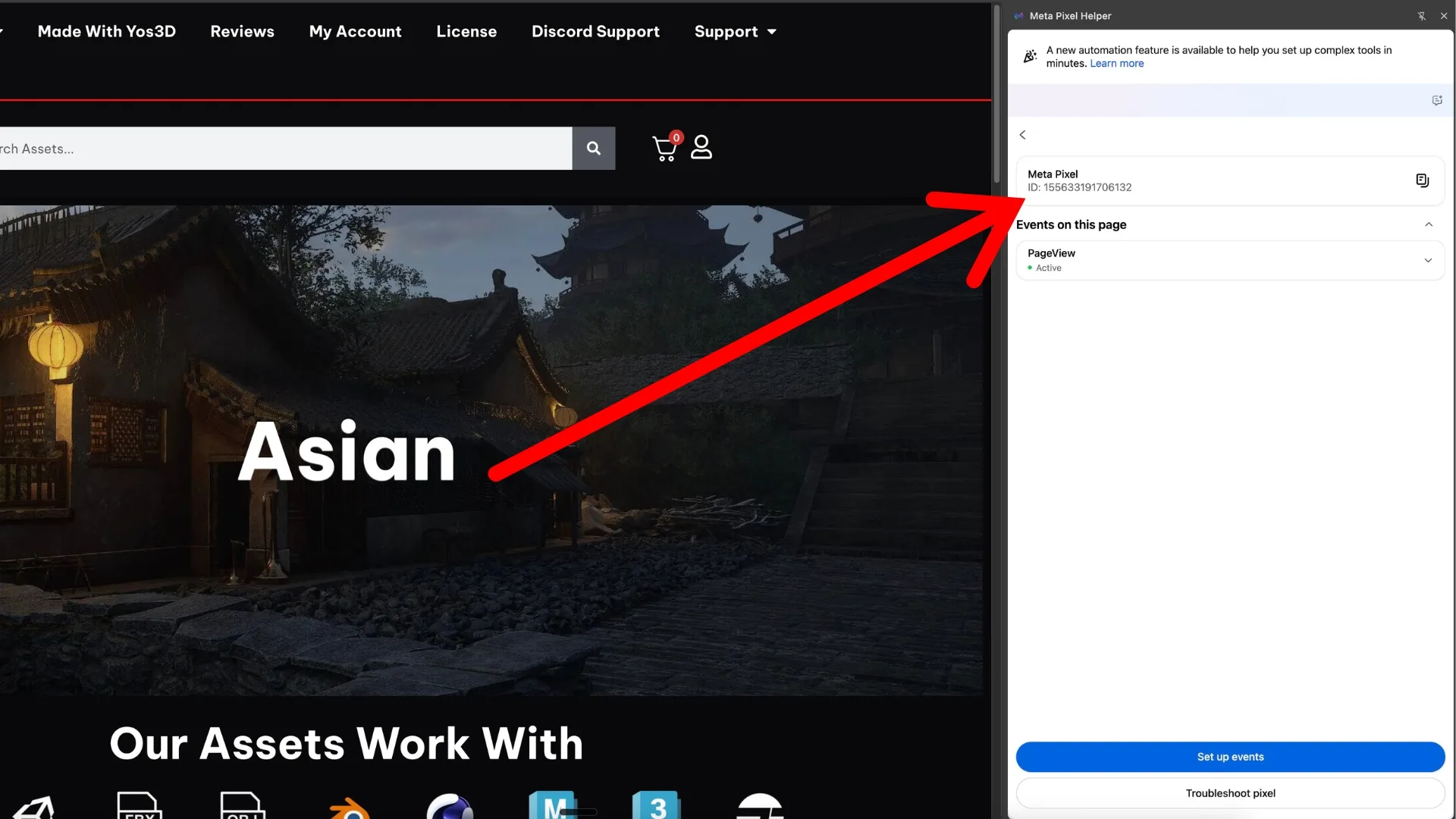
And this is easy to see. Open your website in the browser and see the events flowing inside the Meta Pixel Helper extension:
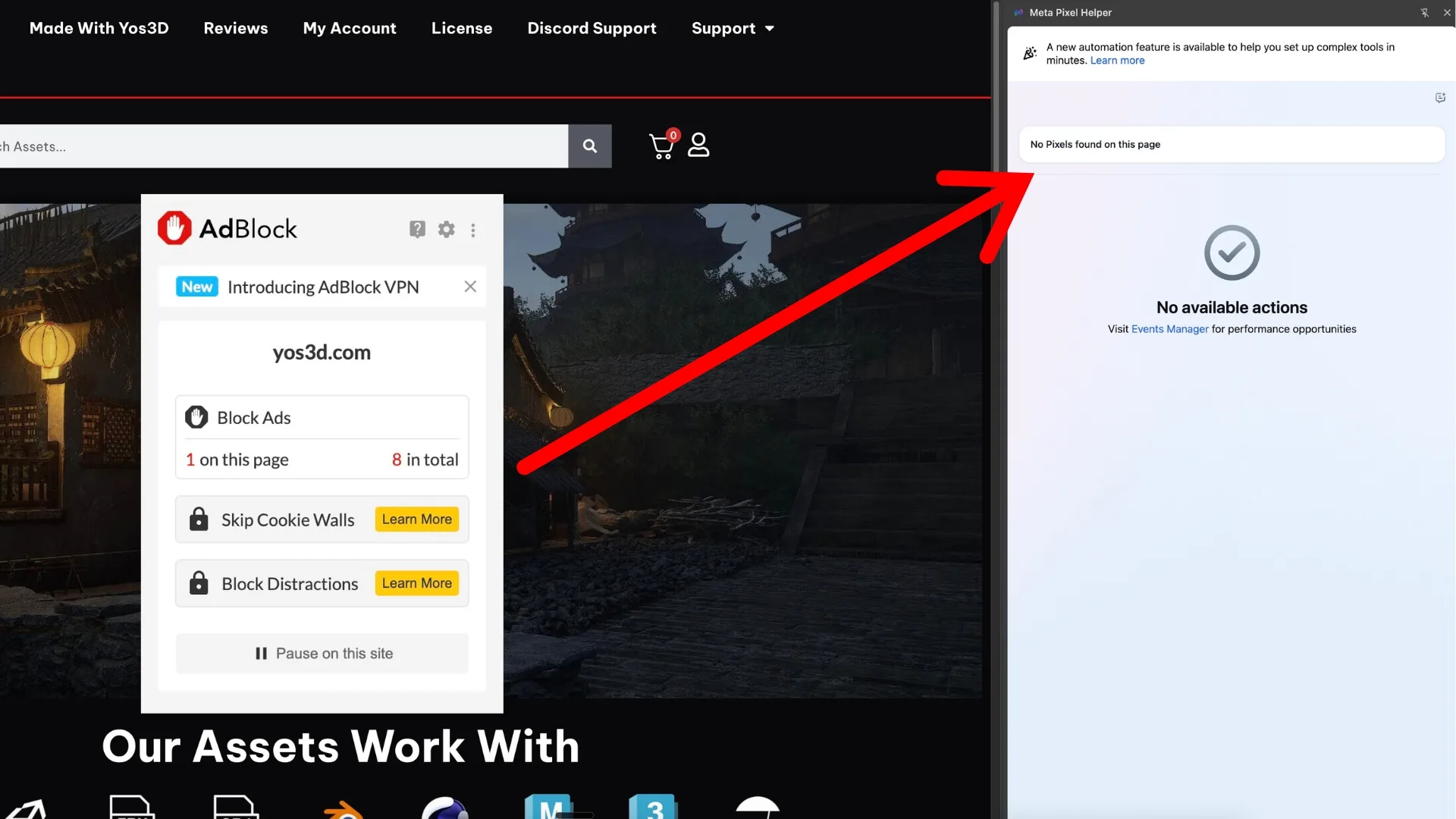
Now, install and then turn on any ad blocker, and load your website again then check the same Meta Pixel Helper extension:
Now you might be thinking a CAPI app or a server-side setup already solved this. But it didn't.
Because most of those "server-side" setups still wait for the browser event to fire first, then hand it off to the server.
So once the ad blocker kills the browser event, the server-side event that was supposed to follow never happens either.
It dies with the event it was waiting to receive.
The native Shopify CAPI works this exact way, which is why store owners who rely on it never get complete data.
Problem two: even when it fires, the data is wrong
Blocking is only half of it. Say the pixel does fire cleanly.
That still doesn't mean the right data made it back.
Tracking is a two-way street. Meta doesn't just need to know a sale happened.
It needs the details that come with it, the email that says who bought, the click ID that says which ad they came from, the IP address, the browser ID, and every other identifier that helps Meta match the sale to a real person.
If any of those pieces go missing, the pixel reports an incomplete version of the truth, and the algorithm ends up targeting half-blind.
This is the most common thing I see across real Shopify accounts, over and over again.
The pixel fires green, every event shows up in the test tool, the setup seems completely fine, but the data behind it is still full of holes nobody noticed - until the spend goes up and sales go down.
That's the reason why even when the pixel fires, it's no guarantee your tracking is actually working.
The thirty-second check that tells you the truth
You don't have to take any of this on faith. There's a dead-simple way to see it for yourself.
Open your Shopify backend and look at your real sales for a given window.
Then look at what Meta says it drove for that same window. Compare the two numbers.
If they don't line up, and on most stores they don't, your tracking is off.
The wider the gap, the more you are flying blind every time you decide where your budget goes.
That gap is the whole problem in a single number. And closing it is what actually moves your sales up.
What actually fixes it
Every issue so far traces back to one root.
The pixel depends on the browser, and the browser is the exact place where both the blocking and the data loss happen.
Remove that dependency and the problem disappears.
That is the idea TrueMetriks is built on. It runs purely server-side and fires nothing in the browser at all.
Its tracking code isn't typical tracking code either, so browsers and ad blockers don't recognize it as tracking and can't block it.
There is no browser event to kill, so there is nothing for an ad blocker to cut off.
And getting the event through is only half of what it does.
It also collects everything Meta needs to make sense of that sale, the customer's email, the click ID, the IP address, the browser ID, and every other identifier worth gathering, then sends the complete data straight to Meta so the algorithm has real signal to optimize on.
That closes both leaks at once.
Meta gets clean, complete data and stops guessing, and you get to see the real picture for yourself, your true numbers across every channel instead of whatever survived the trip back to Facebook.
The takeaway
Stop checking whether the pixel fires. Start checking whether the data behind it is actually arriving.
A green pixel and complete data are two very different things, and only one of them grows your store.