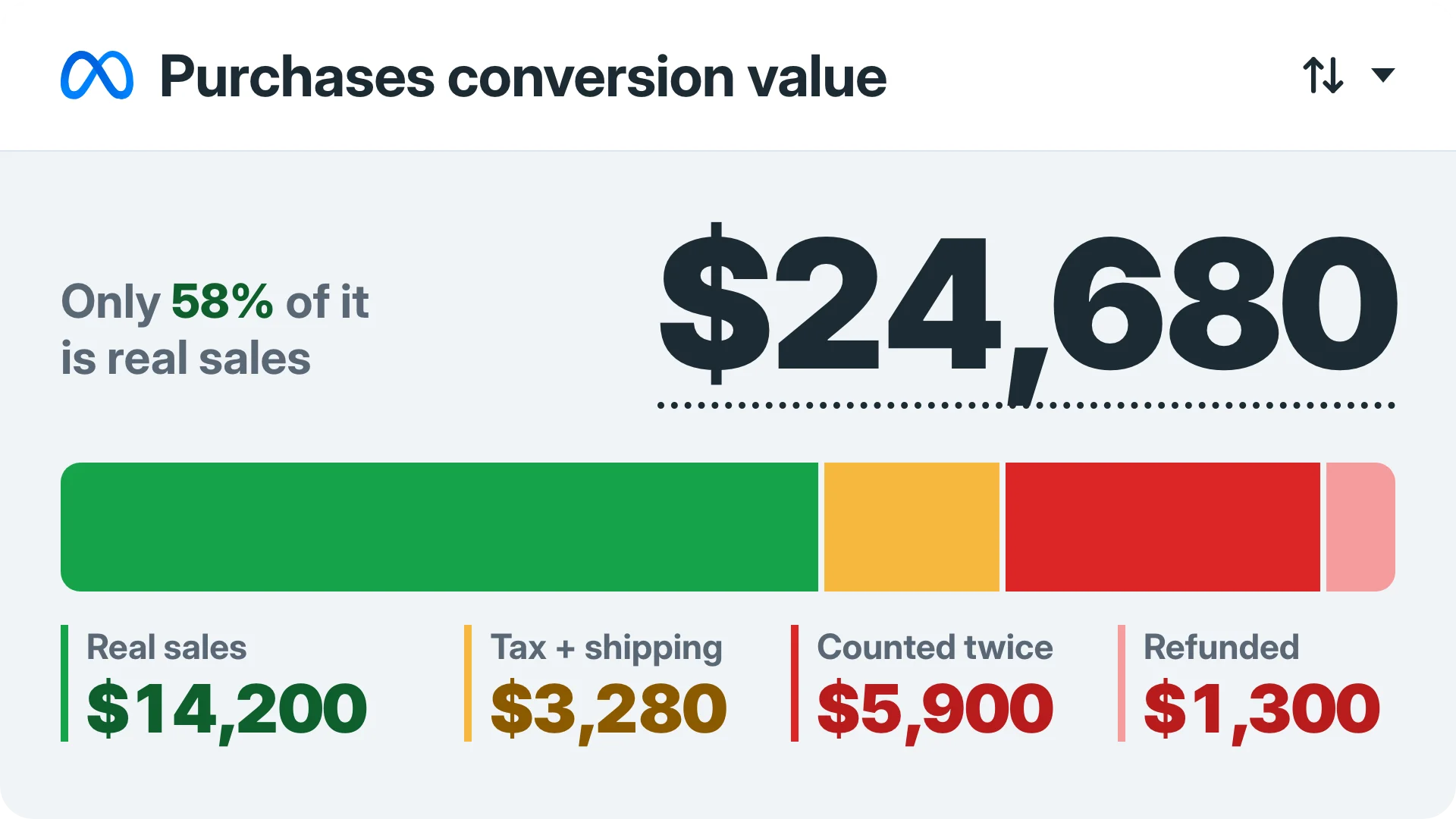
Conversion value is the money a conversion is worth, and it's the number Google Ads and Meta use to work out your ROAS and, once you switch on value bidding, to decide which buyers to go after.
The platforms don't measure that number though. Your tracking sends it to them with every conversion, so when your tracking sends the wrong number, your ROAS and your bidding both run on it and nothing in the dashboard tells you.
Below is what it means in Google Ads and Meta, how both platforms use it, and how to check that the number in your ads is the real one.
What is conversion value?
Conversion value is the money a conversion is worth to you, sent to the ad platform along with the conversion itself.
For a store, that's the value of the order. For lead gen, it's a value you assign to a lead, or to each stage a lead goes through.
The conversion value formula is conversions × value per conversion, or the sum of each order's value, which is what a store's tracking actually does since every order is a different amount.
(If you're here for convertible bonds, this isn't that post.)
So 50 purchases worth $3,000 in total is a conversion value of $3,000 ($60 per conversion), and the platform only knows it's $3,000 because your tracking told it so.
Static vs dynamic conversion value
There are 2 ways to give a conversion its value, and picking the wrong one for your business means every number downstream is off before your ads even start.
A static value is the same number on every conversion: you decide a lead is worth $50, and every lead goes to the platform as $50. That works for lead gen, where there's no order total to send.
A dynamic value is the real value of each order, passed by your tracking with each purchase. A store needs this, because a $20 order and a $400 order are not the same buyer.
When a store runs on a static value, it's telling the platform every buyer is worth the same, so the platform has no reason to go looking for the bigger ones.
Lead gen can go one step further and give each stage its own value (a lead, a booked call, a sale), so the platform learns which leads turn into money.
I've covered how to set that up in getting better leads and buyers on Facebook and in the post on longer sales cycles.
If you sell products, send the real value of every order, and if you sell to leads, give each stage its own value so the platform can tell a lead from a sale.
How Google Ads and Meta use conversion values
Once the value reaches the platform it shows up in 2 places, your reports and your bidding, and that's why getting it wrong costs you twice.
The reports side starts with ROAS, which is conversion value ÷ ad spend. Spend $1,000, get $3,000 in conversion value, and your ROAS is 3 (the full breakdown is in the ROAS formula post, and there's a ROAS calculator for your own numbers).
Google Ads shows conversion values in 3 columns. "Conv. value" is the total, "Value / conv." is conversion value ÷ conversions (the average per conversion), and "Conv. value / cost" is conversion value ÷ cost, which is Google's ROAS column.
Multiply that last one by 100 and you get the percentage Google uses for a target ROAS.
In Meta, the value travels on the Purchase event as 2 parameters, value and currency, where currency is a 3-letter code like USD or GBP. Ads Manager shows the total as "Purchases conversion value", and the ROAS that comes out of it as "Purchase ROAS".
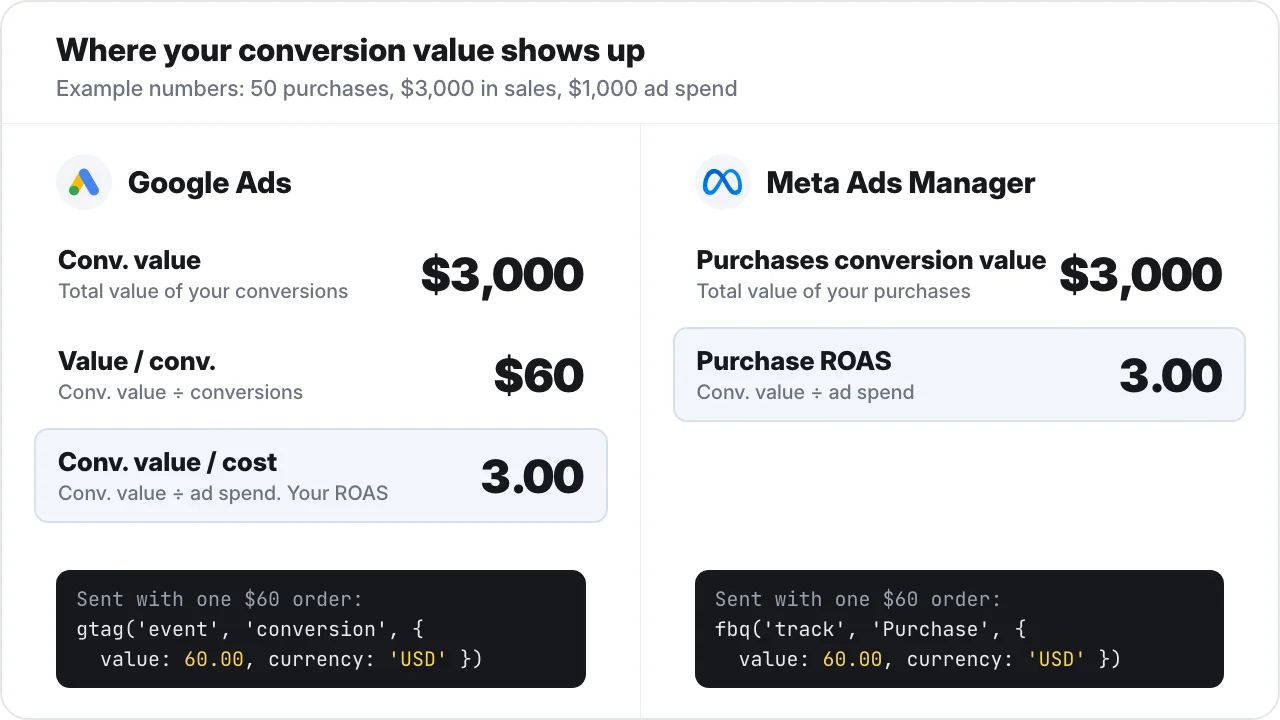
That's the side most advertisers look at. The bidding side is the one that spends the money, and it reads the exact same number.
Every ROAS number you see in Google Ads or Meta is conversion value divided by spend, so it can only ever be as right as the value your tracking sends.
Maximize conversion value bids on the number you send
Maximize conversion value is where a wrong number stops being a reporting issue, because this is the bid strategy that spends your budget chasing it.
In Google Ads, Maximize conversion value spends your full daily budget to get the most total conversion value it can. You decide what that value is when you set up conversion tracking, usually sales revenue, though some advertisers send profit margins instead.
It's available on Search, Shopping and Demand Gen.
Add a target ROAS and it aims for that return instead, so it may not spend your full budget. This used to be called "Maximize conversion value with a Target ROAS", and since June 2026 it's just "Target ROAS", same behaviour.
Google also has conversion value rules, which multiply the value for specific customer types, devices or locations.
Before you switch it on, Google's own guidance is to send values for 3 weeks or 1 to 2 conversion cycles, whichever is longer, and not to backfill old values. So whatever your tracking sends in those weeks is what the bid strategy starts from.
Meta has the same setup under different names. The performance goal is "Maximize value of conversions", which needs an event that sends a value and a currency, plus enough purchases with different values to learn from.
Then you pick "Highest value", which spends your full budget going after the highest-value purchases, or "ROAS goal", which keeps your average ROAS around your goal and may spend less.
None of these check your number. Maximize conversion value, Target ROAS, Highest value and ROAS goal all chase whatever value you send, true or not.
Why your conversion value is probably wrong
Most advertisers I talk to treat a wrong conversion value as a reporting problem: the dashboard's a bit off, fine, they know roughly what they made. It's a bidding problem.
Every value-based bid strategy above bids on the number you send, so when tax, a double count or a hard-coded $100 inflates it, the algorithm goes looking for more of the buyers that made that fake number go up.
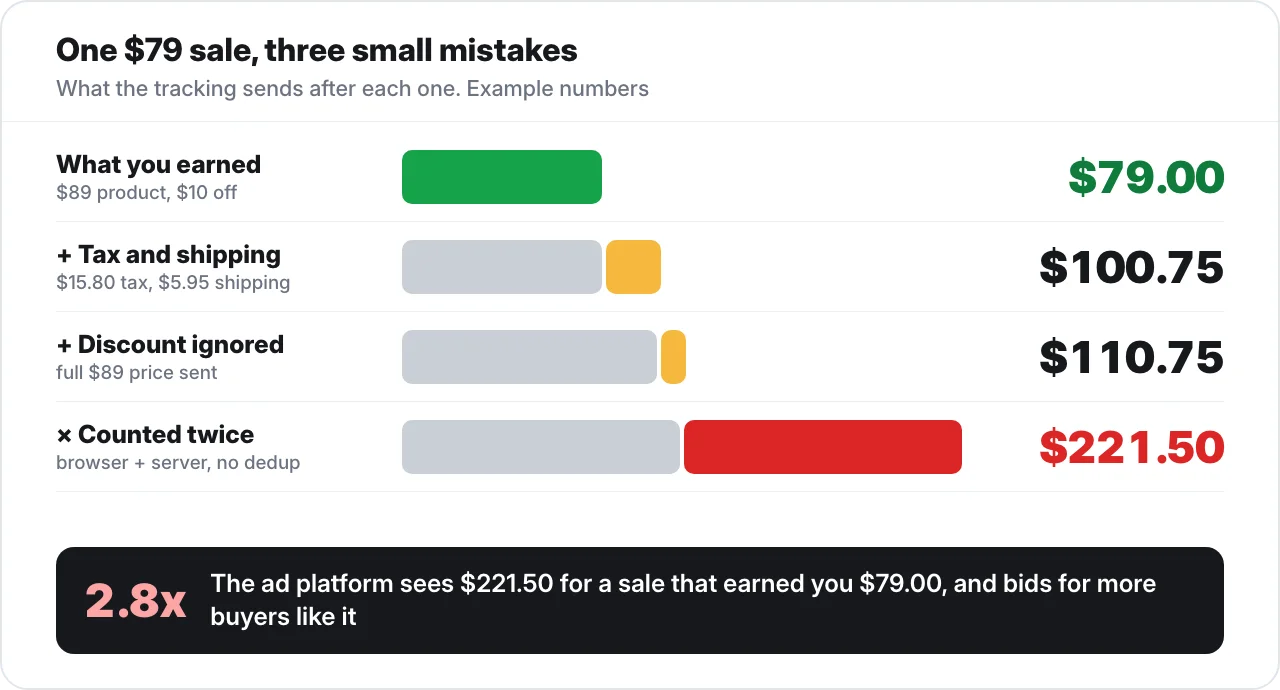
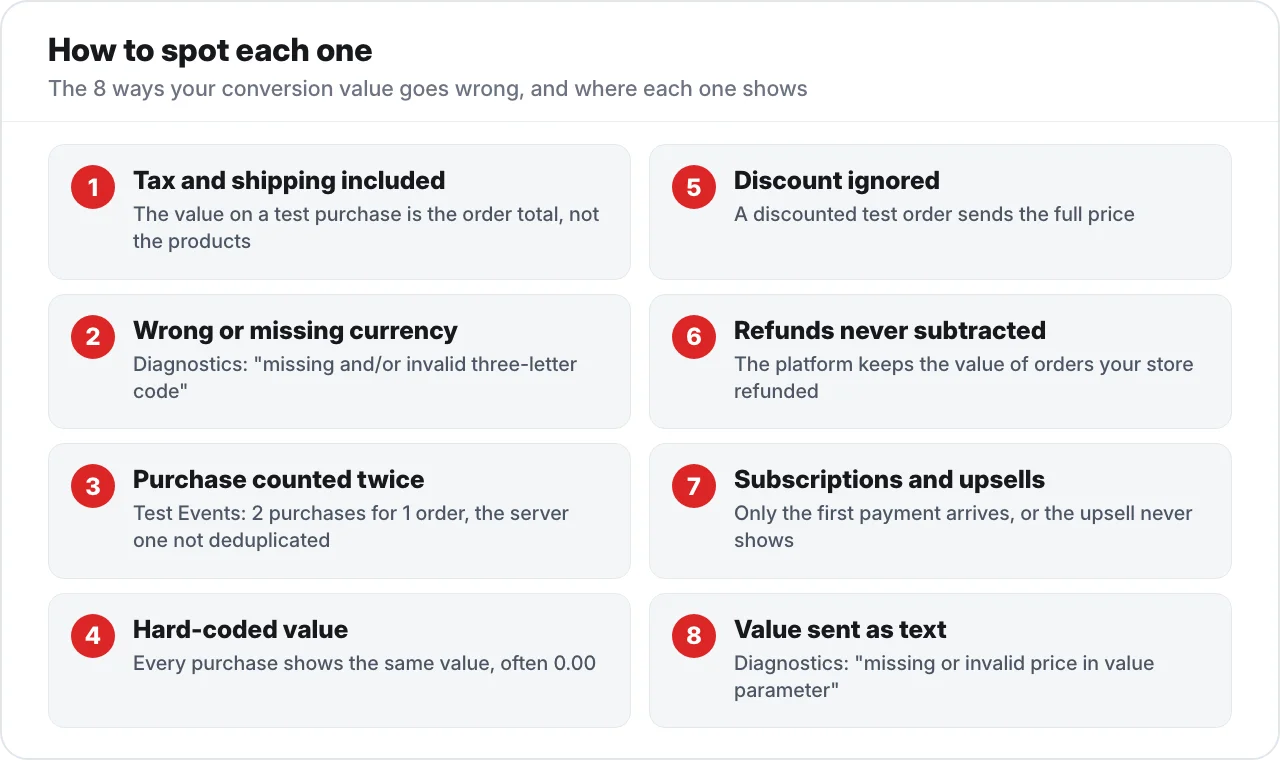
Here are the 8 ways the value your tracking sends ends up different from what you actually made, with how to spot each one and the fix.
Tax and shipping are in the value
Your tracking sends the checkout total, tax and shipping included, so the platform credits your ads with money that went to the government and the courier, and your ROAS looks better than it is.
You'll spot it when a test order's value matches the checkout total, not the subtotal. Pick revenue before tax, decide once whether shipping is in or out, and send it the same way every time.
The currency is wrong or missing
A store selling in EUR sends USD, or no currency at all, so the platform reads the number in the wrong money. Meta flags a "missing and/or invalid three-letter code" in Events Manager, and also "mismatches in currency and/or value parameters" between the Pixel and the Conversions API.
That second one matters because when the 2 events are deduplicated, the one Meta keeps may not carry the true value, "which may lead to inaccurate ROAS". Send your store's 3-letter currency code, the same one from the browser and the server.
The purchase is counted twice
The browser and server events aren't deduplicated, or the pixel is installed twice, or automatic events fire on top of the ones you coded, and the value doubles along with the count.
You'll see more purchases in the platform than orders in your store, or 2 purchases in Test Events for 1 order. Send one Purchase per order, with the browser and server events sharing the same event ID so Meta keeps one.
How deduplication works is in the Meta Conversions API post, and the other causes of a gap are in backend sales that don't match Facebook purchases.
The value is hard-coded
Every purchase goes out as the same fixed number, usually left over from a template or a snippet someone copy-pasted. Meta's own default code for the Purchase event ships with a value of 0.00 and USD, and you're meant to replace it.
You'll spot it when "Value / conv." is a suspiciously round number, or every test purchase shows the same value whatever was in the cart. The value has to come from the order itself.
Discounts are ignored
The customer used a 20% code and paid $80, but your tracking sends the full $100 price. So every discounted order inflates your conversion value by exactly the discount.
Make a test order with a discount code and check what goes out, then send the amount the customer paid after discounts.
Refunds are never subtracted
The money went back to the customer, and the platform still has the original value.
Google has a fix for this called conversion adjustments: a restatement changes the value but keeps the conversion (a partial return), and a retraction removes the conversion and takes its value to 0 (a full refund or a cancel).
On Meta, the honest answer is to watch refunds in your store and keep them in mind when you read the value.
Subscriptions and upsells are cut short
Only the first payment goes out, or the post-purchase upsell never gets sent at all. This one runs the other way: your conversion value comes out lower than it should, so the bidding undervalues the buyers who are worth the most to you.
Compare what an ad order is worth in your store with "Value / conv." or Meta's value, then decide on purpose what you send for a new subscriber and send the upsell as its own value.
The value is sent as text
The value goes out as "$99.00" with a dollar sign, or "1,299.00" with a comma, when the platforms expect a plain number like 99.00. Meta flags it in Events Manager as a "missing or invalid price in value parameter".
Send the number only, no symbol and no comma.
If any of these is happening, your ROAS is off and your value bidding is chasing the wrong buyers, because the only thing it can go by is the number you send.
How to check your conversion value in 10 minutes
You don't need to guess which of the 8 you have, because 3 checks in Events Manager and your store will show you in about 10 minutes.
First, open Events Manager, go to Test Events and make a test purchase, ideally with a discount code so tax, a hard-coded value and the discount all show up in one go.
Then look at value and currency on the Browser row and the Server row: both should show what the order was really worth, in your currency, with the server one deduplicated.
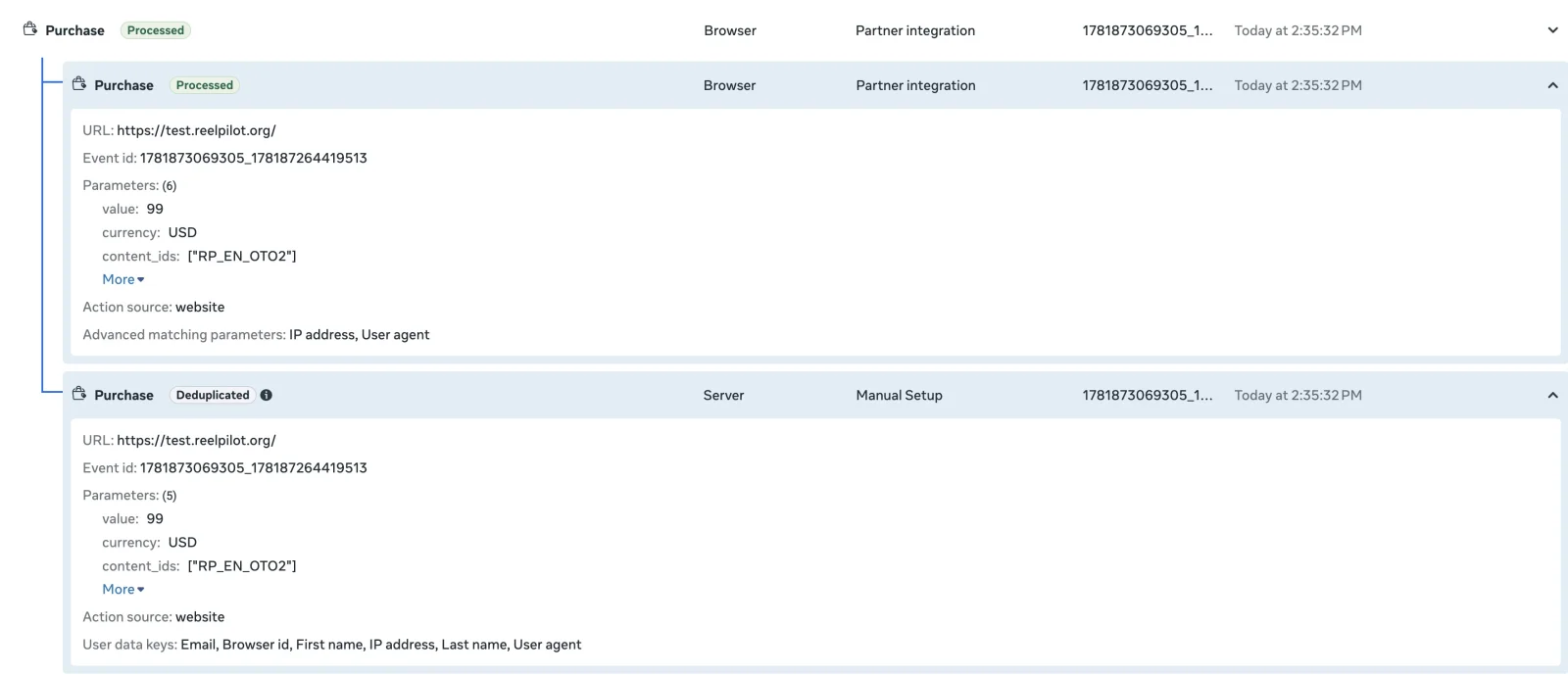
Second, take a week of the platform's conversion value and compare it with your store's revenue from the orders that came from those ads.
They count differently, so they won't match to the dollar, but what we see with our clients, once every sale is tracked properly, is a gap under 10%. If the platform is a lot higher, start with tax, double counts and refunds, and if it's a lot lower, start with subscriptions and upsells.
Third, open the Diagnostics tab in Events Manager, where Meta's currency and value warnings show up. If one of the warnings above is sitting there, you've found your problem.
If the test purchase shows the right value and currency once, and a week of ad orders lands within 10% of your store, your conversion value is the real one.
Conversion value vs revenue vs ROAS vs AOV
These 4 get swapped for each other all the time, and mixing them up is how an advertiser ends up comparing an ad platform's number with the wrong store number.
| What it is | How you get it | Where you see it | |
|---|---|---|---|
| Conversion value | The money the ad platform credits to your ads, as your tracking sends it | The sum of each conversion's value | "Conv. value" in Google Ads, "Purchases conversion value" in Meta |
| Revenue | The money your store actually took, from every channel | Your store's sales | Your store's reports |
| ROAS | Return on ad spend | Conversion value ÷ ad spend | "Conv. value / cost" in Google Ads, "Purchase ROAS" in Meta |
| AOV | Average order value | Revenue ÷ number of orders | Your store ("Value / conv." is the ad platform's version) |
Conversion value is the ad platform's version of your revenue, and ROAS is only as good as that version.
Conversion value FAQ
The short answers, for anyone who skipped down here.
What is conversion value?
Conversion value is the money a conversion is worth, sent to the ad platform along with the conversion. For a store it's the order value, and for lead gen it's a value you assign to each lead or stage.
What is conversion value in Google Ads?
It's the value Google Ads records for each conversion, shown in the "Conv. value" column, and "Conv. value / cost" is your ROAS.
What is conversion value in Facebook ads?
It's the value and currency your Purchase event sends to Meta. Ads Manager shows the total as "Purchases conversion value" and uses it for "Purchase ROAS".
Should conversion value include tax and shipping?
Leave tax out, because it was never your money. Shipping is your call, as long as you decide once and send it the same way on every order.
What's the difference between conversion value and revenue?
Revenue is what your store actually took. Conversion value is what the ad platform credits to your ads based on what your tracking sends, so it can be higher or lower than the real thing.
What does maximize conversion value mean?
It's the Google Ads bid strategy that spends your full daily budget to get the most total conversion value. Add a target ROAS and it becomes "Target ROAS", which aims for that return and may spend less. Meta's version is the "Maximize value of conversions" goal.
Why is my conversion value higher than my actual sales?
Usually it's counted twice, includes tax and shipping, or never has refunds taken off, and a test purchase in Events Manager plus a week against your store will tell you which.
Send the real number
Anyways, the platforms will bid on whatever conversion value you give them, so the only part you control is whether it's the real one.
TrueMetriks does that part for you: it sends each sale from the server with the real order value, deduplicated, so the platforms bid on what you actually made. Here's how that compares with setting up the Meta Conversions API yourself.
So send the real order value, once per order, and let the bidding chase that.