
If you run ads in Health and Wellness, finance, employment, housing, or any vertical Meta classifies as sensitive, you already know your account is restricted.
You saw the notification. You watched the events stop optimizing and ROAS dropping to all-time lows.
The good news is the fix is very simple, you can use custom events to optimize for the most important events such as purchases, leads and call bookings.
Once the data starts flowing into these custom events, they behave the same way as standard purchase, lead, and booking events. The algorithm finds your buyers, sales come in, and the restriction stops mattering.
However, there are a few nuances you have to get right for that to happen, and getting any one of them wrong keeps the account stuck.
The wrong fix everyone tries first
The first move most advertisers make is the one Meta itself surfaces inside Ads Manager.
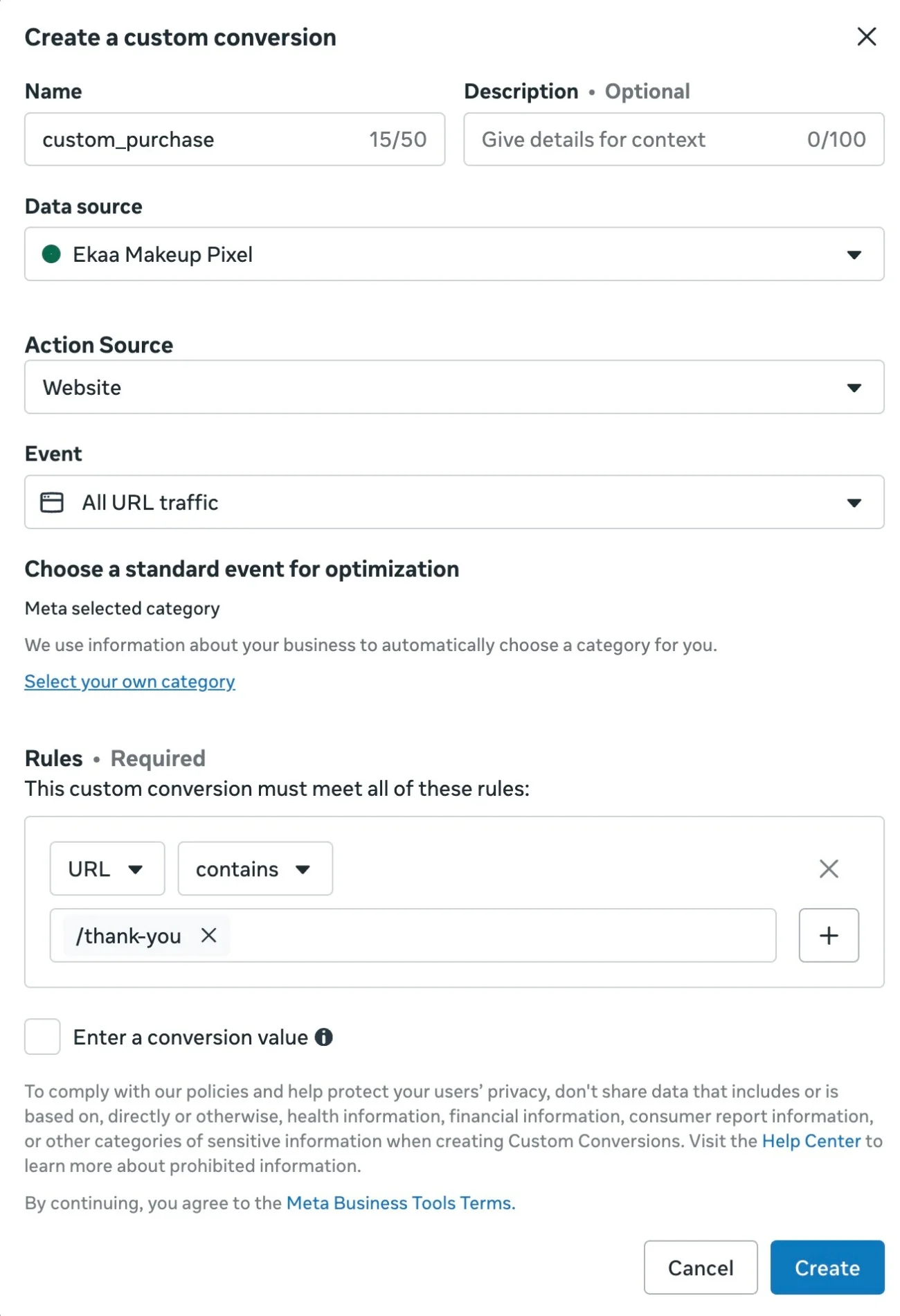
You open the dashboard, find Custom Conversions, point a rule at a URL like /thank-you or /confirmation, save it, and assume the algorithm now has a signal to optimize against.
It does not. URL-based custom conversions are the cleanest example of how a fix can be worse than running nothing.
The event fires on pageview. Every reload, every back-button hit, every refresh on the order confirmation page registers as a new conversion.
Duplicates everywhere, with no real identifiers for Meta to dedupe against.
The event also carries no customer data. No hashed email, no fbclid, no purchase value.
Meta gets a count. The algorithm cannot find more buyers from a count.
Worse, the reporting starts inflating. Ads Manager shows ROAS climbing. Backend sales do not move.
Most advertisers stay stuck on this for months, mistaking the inflated dashboard number for recovery.
By the time they figure out what is happening, they have spent another quarter optimizing toward a hollow signal.
A URL-based custom conversion tells Meta something happened on a page. It cannot tell Meta who that person is, which ad they came from, or what they bought.
The algorithm has nothing to work with.
The real fix, and the three places almost everyone gets it wrong
The fix that actually restores signal in a restricted account is a custom event. Not a custom conversion in the Ads Manager UI.
A real event, fired from your site, sent to Meta with real customer data attached.
And worth saying clearly, because most advertisers assume otherwise: this is not a workaround.
Meta's own data source categorization documentation in the Business Help Center states that custom events registered in Events Manager are how restricted advertisers continue to optimize for the conversions standard events no longer cover.
The path is built into the platform, most advertisers just never find it because Meta does not surface it inside Ads Manager next to the URL-based custom conversion UI.
There are three places to get this right. Each one matters on its own.
Get any one of them wrong and Meta will either reject the event, restrict you again, even ban your account, or treat the signal as useless.
1. The event NAME has to be arbitrary
Do not name your event custom_purchase. Do not name it health_lead. Do not name it anything that hints at what the conversion actually is.
Meta scans event names for sensitive patterns. The classifier sees purchase, lead, checkout, treatment, therapy, relief, supplement, and the event gets routed back into the restricted bucket you were trying to escape.
The name needs to mean nothing. A random-looking string. Something like Kenny_Florian or ABC_42 or any pairing the classifier cannot match against a sensitive pattern.
It looks strange when you set it up. That is the point. The classifier sees a string with no meaning and treats it like a generic custom event.
You know it represents a purchase. Meta has no idea.
Once the event is firing under an arbitrary name, the algorithm starts treating it as a usable optimization target. The classifier has nothing to grab onto.
2. The DOMAIN cannot give the vertical away
This is the place most advertisers miss completely. Meta requires that the domain firing the event is sent back with every event payload. The classifier reads it.
If your domain is literally diabetesdestroyer.com, every event you fire is labeled with that domain.
Meta reads the URL string, sees the word diabetes, and re-classifies your account into the sensitive category no matter how well you named your events.
You spent hours wiring an arbitrary custom event and the domain string did the work of restricting you again.
The same applies for anything else the classifier can recognize. anxietyrelief.com. loanapproval.com. weightlosscoach.com. The domain itself is a flag.
If you are in a restricted vertical, the domain has to be neutral. Brand-safe. Nothing the classifier can match.
That can mean rebranding the purchase domain to something the classifier reads as generic, or running the conversion flow through a separate clean domain and redirecting traffic at checkout.
Either way, the domain that touches Meta has to look like nothing.
3. Product names and event metadata have to be scrubbed
The third place advertisers get caught is the event payload itself. The custom event has fields. content_ids, content_name, content_category, custom parameters.
Whatever you put into those fields is sent to Meta and read by the classifier.
If your product is called Diabetes Destroyer and you send content_name: "Diabetes Destroyer" on every purchase event, you have handed Meta the exact information the arbitrary name was supposed to hide.
Same for Anxiety Relief Formula, Joint Pain Solution, Hair Loss Reversal, anything where the product name is the diagnosis.
What you send instead is non-descriptive. A SKU. A hashed product reference. A generic content ID. Whatever lets your own systems map back to the product without telling Meta what was bought.
What you DO send on the event is real customer data: hashed email, first name, the fbclid that came in with the visitor, purchase value, currency.
The algorithm uses those to find more buyers like the one who just converted. It does not need to know the product was Diabetes Destroyer to do that work.
It needs to know who bought, what they paid, and which ad brought them in.
Arbitrary event name. Neutral domain. Scrubbed product metadata. Miss one and the classifier finds you again. Get all three right and the event becomes a usable signal.
Do this before you launch, not after
The advertisers who recover fastest from a restriction are the ones who set this up before Meta classifies their domain in the first place.
If you are about to launch into Health and Wellness, finance, or any other vertical Meta is restricting, do the three things now.
Choose a domain the classifier cannot read. Set up the custom event with an arbitrary name. Scrub the payload of every product string and sensitive identifier.
Setting it up clean from day one costs an afternoon. Recovering after a flag costs weeks of dead campaigns and inflated dashboards.
For advertisers already restricted, the same three steps apply, in the same order.
Domain first, because that is the layer Meta re-reads on every event. Event name second. Payload scrub third.
Meta is not blocking your ability to optimize. It is blocking the path most advertisers try first.
Arbitrary event name, neutral domain, scrubbed product metadata, real customer data on the payload. Those four pieces, set up correctly, are the difference between an account stuck on PageView and an account back to optimizing for purchases even in restricted categories.
If wiring this yourself sounds like a lot, that is because it is.
Choosing a clean domain, naming the event arbitrarily, scrubbing every product string out of the payload, firing on both browser and server with matching event IDs, hashing customer data correctly, and handling the Events Manager acceptance step is the kind of work that takes a senior developer a week to get right and a junior developer a month to get wrong.
This is exactly the plumbing TrueMetriks handles by default for advertisers in restricted verticals.
You bring the clean domain and the rules from this post. The rest is set up out of the box.